How to build an AI agent for customer support: tools, guardrails, memory, and evals
A step-by-step walkthrough in an AI agent builder, from first prompt to a tested, deployed agent
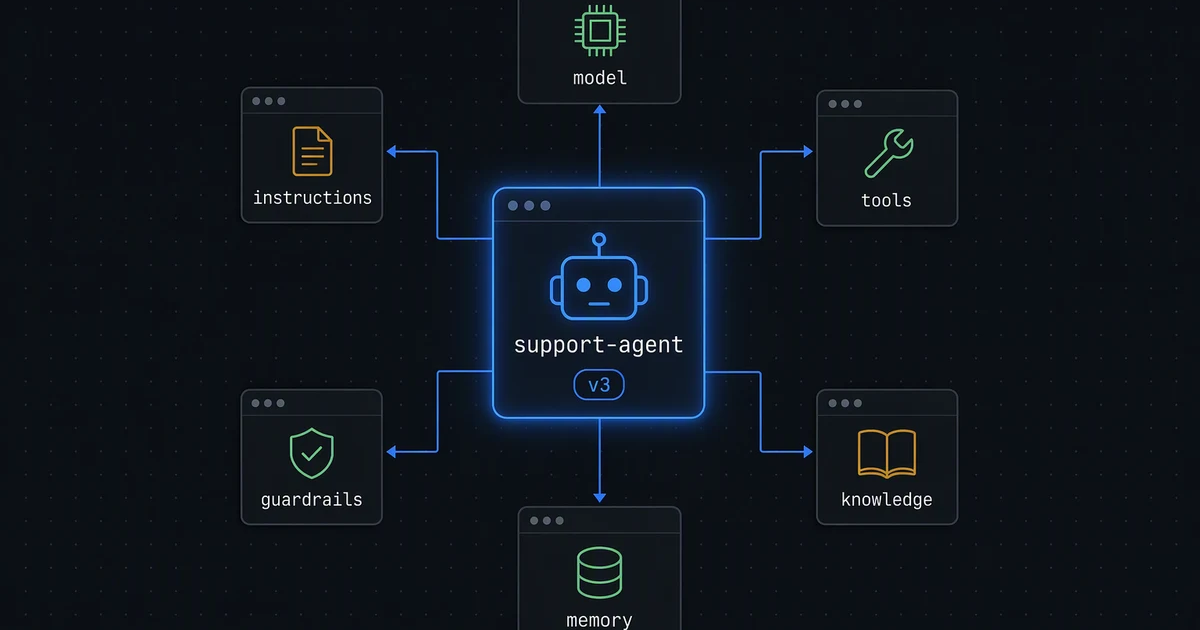
If you want to know how to build an AI agent that holds up in production, start here: a system prompt and a model are a demo. An agent you can put in front of customers needs more: tools with sensible permissions, guardrails, knowledge it can cite, memory that doesn't leak between customers, tests, and logs. Most of the work is the boring part.
This is how to build an AI agent for customer support, step by step, using Koodisi's Agent Studio as the AI agent builder, with the decisions I'd make at each step. (Disclosure: I work on Koodisi at iVoyant. The checklist applies to any agent platform.)
What we're building
An agent that answers customers' questions about their orders. It should:
- look up order status and shipping details,
- explain the refund policy accurately,
- start a refund, but only with approval,
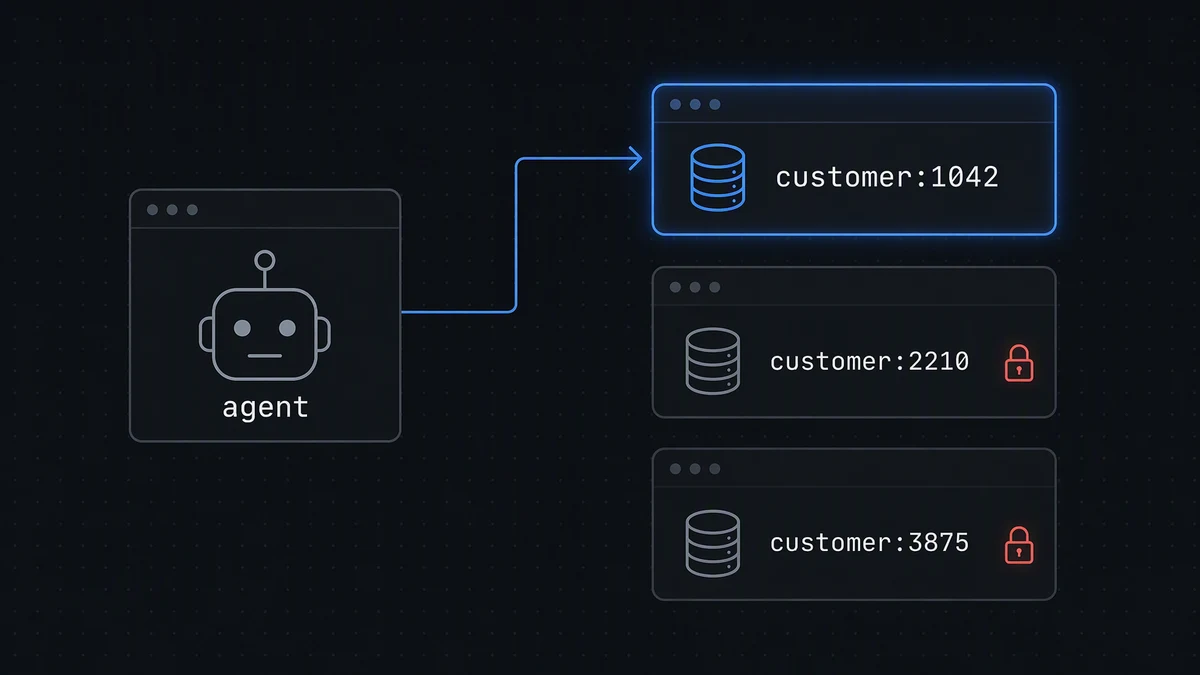
- remember context about the customer it's talking to, and nobody else,
- and be tested before every release.
In Agent Studio, an agent brings together a model connection, instructions, tools, knowledge, and memory into one reusable capability. You build it once, publish it, and attach it to workflows.
1. Create the AI agent
The New agent wizard collects the basics: name, description, tags, and visibility (this workspace only, or the entire organization). Then the instructions, which are the system prompt:
You are the order-support assistant for Acme.
- Always look up the order before answering questions about it.
- Quote the refund policy from the knowledge base; never invent terms.
- Never promise a refund. Start one only with the refund tool, which needs approval.
- If you can't find the order, ask for the order number and email.
Keep instructions short and behavioural. Policy text belongs in the knowledge base, not the prompt.
2. Attach a model connection and tools
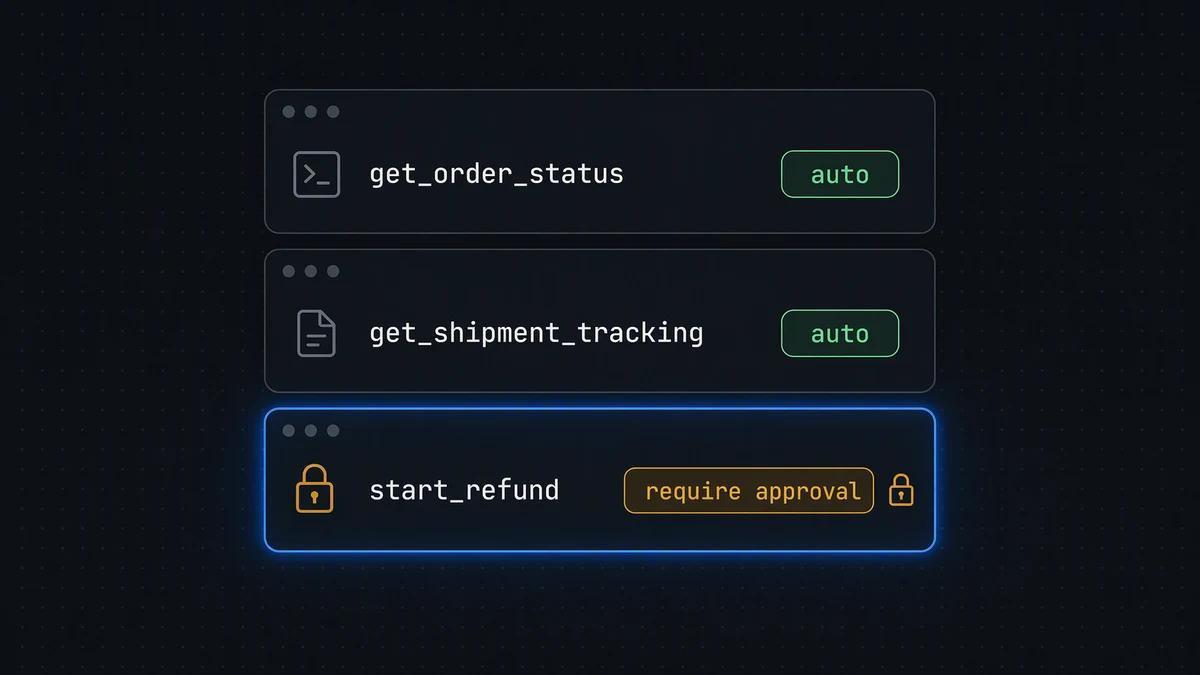
On the Capabilities tab you pick the connection, which holds the model and its sampling settings, and attach tools from the registry. This is where the interesting decision lives: every tool gets a run mode:
| Tool | Run mode | Why |
|---|---|---|
get_order_status |
Auto | Read-only, safe to call freely |
get_shipment_tracking |
Auto | Read-only |
start_refund |
Require approval | Moves money; a person confirms |
The third option, Let agent decide, is useful for low-risk actions where the agent can judge whether to ask. For anything financial, I'd always choose Require approval.
You can also link MCP sources (if a tool lives behind an MCP server, including one that needs its own OAuth sign-in) and other agents to delegate to over A2A.
3. Add guardrails
Guardrails attach from a registry too, and each runs at a stage:
- Input checks can block a run before any model call. Use these for things like prompt-injection patterns or out-of-scope requests.
- Tool use and Output checks are recorded but don't block the run. They're your audit signal: review them in the logs.
That distinction is worth knowing before you rely on a guardrail. If something must never reach the model, it needs an Input-stage check.
4. Give it knowledge
The Knowledge base tab takes file uploads, such as the refund policy, shipping FAQ, and returns process. Studio parses and indexes each file and shows a status tag (Not indexed, Indexed with a chunk count, or Indexing failed). Removing a file re-indexes without it, so stale policy can be retired cleanly.
5. Turn on memory, keyed by customer
Memory is off by default. When you turn it on you choose:
- Memory types: episodic (conversation history), semantic (facts and preferences), procedural (learned steps).
- Recall top K and a similarity threshold for retrieval.
- Visibility: private to this agent or shared with the organization.
The setting that matters most for a support agent is entity-keyed memory: thread memory by a business entity such as a customer ID instead of by session. Set the entity key to the customer ID and the agent remembers that a customer prefers email updates, without that preference ever surfacing in someone else's conversation.
The Memory inspector shows what the agent has actually stored once it runs in a deployed workflow, filterable by entity. It's read-only, which is what you want for auditing.
6. Limit each turn
On Configuration → Run settings:
- Max iterations: the most tool-call/response cycles per turn (default 8).
- Max total tokens: a hard cap per turn across prompt, completion, and every tool call (50K up to unlimited).
A support agent rarely needs more than a few tool calls. Tight limits turn a confused loop into a cheap, visible failure instead of an expensive one.
7. Publish, then test in a real conversation
An agent has at most one open draft and one published version. Save draft, then Publish: there's no confirmation, and the version number goes up each time.
The Chats tab talks to the published version, the same one a deployed workflow reaches, as a continuous conversation. I test the unhappy paths first:
- "Refund my order" without an order number
- An order number that doesn't exist
- A question the policy doesn't cover
8. Turn those tests into AI agent evals
Manual chats don't scale. A dataset is a reusable set of test cases; an eval runs a dataset against the published version and scores it. Each case checks one of two things:
- Tool choice: the agent must call at least one of the named tools. For "Where is order 1042?" the expected tool is
get_order_status. It checks by name, not call order, so a valid alternate approach isn't punished. - Final answer: graded by contains, exact match, regex, or a rubric graded by an LLM judge. For "Can I return a sale item?" the rubric might say "states the policy from the knowledge base and doesn't promise a refund".
Because LLM-judged rubrics can vary slightly, set repetitions per case above 1. Run the eval before every publish, and you have a regression suite for an agent.
9. Deploy it in a workflow
Agents aren't deployed on their own: you add an AI Agent activity to a workflow and select the published agent. The activity takes a frozen snapshot of the published configuration (connection, model, instructions, memory settings, knowledge, tools, and guardrails), so later edits to the agent's draft can't change production underneath you. To roll out a new version, you publish and re-select it deliberately.
10. Read the logs
The Logs tab records every turn with status, conversation ID, entity, model, token usage, and duration, and each row opens a turn trace: a waterfall of what happened in that turn. When a customer says "the bot told me something weird", that's where you find out exactly what it saw and did.
A checklist for building any AI agent
- Instructions are short and behavioural; policy lives in knowledge.
- Every tool has a deliberate run mode; anything that moves money needs approval.
- Anything that must never reach the model has an Input-stage guardrail.
- Memory is keyed by the business entity, not shared across customers.
- Iteration and token limits are set.
- An eval dataset covers tool choice and answer quality, and runs before each publish.
- Production uses a pinned, published version.
- Logs and turn traces are reviewed regularly.
How are you structuring evals for your agents? I'd like to hear what's working in the comments.
Further reading
- How to create an MCP server from your REST API (with OAuth, scopes, and risk classes): my companion post on giving agents tools safely
- AI agent governance framework: a practical guide: who approves what agents can do
- AI business process automation: where AI fits and how to govern it
- How to expose your API as a governed MCP server: the longer, end-to-end guide
- MCP connectors: how they work and how to choose them
- Workflow orchestration vs workflow automation: where agents fit inside larger processes
About the author
I am a developer from India with a good eye for frontend logic and design. I am also well acquainted with the backend and business logic so that's add to my ability to create a good frontend while making it easily integratable with backend.
Comments
Join the discussionNo comments yet. Be the first to comment.